Working with ZMAP+ grid files in Python

I just added to the awesome Geoscience I/O library a notebook showing how to use Python to read in an XYZ grid file in legacy ZMAP+ format as numpy array, display it with matplotlib, write it to a plain ASCII XYZ grid text file. I will use the DEM data for Mount St. Helens BEFORE the 1980 eruption, taken from Evan Bianco’s excellent notebook, which I converted to ZMAP+ (that part I will demonstrate in a future post / notebook).

You can get the full notebook on GitHub.

ZMAP plus files have a header section that looks something like this (this one comes from the DEM file I am using):

! -----------------------------------------
! ZMap ASCII grid file
!
! -----------------------------------------
@unnamed HEADER, GRID, 5
15, 1E+030, , 7, 1
468, 327, 0, 326, 0, 467
0. , 0. , 0.
@

where the rows starting with a ! symbol are comments, and the rows in between the two @ symbols store the information about the grid. In particular, the first two entries in the third line of this column are nrows and ncols, the number of rows and columns,  respectively.

The header section is followed by a data section of ncols blocks each containing nrows elements arranged in rows of 5 (given by the last number of the first row with the @ symbol.

OK, let’s get to it.

I break the task of reading in two parts: the first part is to gather from the header the information I will be using. I want from the section between the two @s:

  • the second entry in its second line – the null value
  • the first two entries in its third line – the number of rows and columns, as mentioned
  • the last four entries in its third line – the xmin, xmax, ymin, ymax, respectively

I am making the assumption that the number of commented rows may not be the same in all ZMAP+ files, hence I abandoned my first approach which was based on using getline with specific line numbers. Instead, I used:

  • an if statement to check for the line beginning with @ (usually followed by a grid name) but not @\n; then grab the next two lines
  • another if statement to check whether a line starts with !
  • a counter is increased by one for each line meeting either of the above conditions. This is used later on to skip all lines that do not have data
filename = '../data/Helens_before_XYZ_ZMAP_PLUS.dat'
count = 0
hdr=[]
with open(filename) as h:
    for line in h:
        if line.startswith('!'): 
            count += 1
        if line.startswith('@') and not line.startswith('@\n'):
            count += 1
            hdr.append(next(h)); count += 1
            hdr.append(next(h)); count += 1
            count += 1

which gives:

hdr
>>> ['15, 1E+030, , 7, 1\n', '468, 327, 0, 326, 0, 467\n']

Next I use the line hdr = [x.strip('\n') for x in ','.join(hdr).split(',')] to remove the newline, and the next if / else statement to deal with the null values, if present:

if hdr[1] ==' ': null=np.nan
else: null = float(hdr[1])

Finally, I get the remainder of the information with:

xmin, xmax, ymin, ymax = [ float(x) for x in hdr[7:11]]
grid_rows, grid_cols = [int(y) for y in hdr[5:7]]

Which I can check with:

print(null, xmin, xmax, ymin, ymax, grid_rows, grid_cols)
>>> 1e+30 0.0 326.0 0.0 467.0 468 327

That’s it! I think there is room to come back and write something more efficient later on, but for now I am satisfied this is robust enough to handle headers.

The rest, reading in the data, is downhill, with a first loop to skip the 9 header lines, and a second one to read all elements in a single array:

with open(filename) as f:
    [next(f) for _ in range(count)]                
    for line in f:
        grid = (np.asarray([word for line in f for word in line.split()]).astype(float)).reshape(grid_cols, grid_rows).T
grid[grid==null]=np.nan

Done!!

Visual data exploration in Python – correlation, confidence, spuriousness

This weekend – it was long overdue –  I cleaned up a notebook prepared last year to accompany the talk “Data science tools for petroleum exploration and production“, which I gave with my friend Thomas Speidel at the Calgary 2018 CSEG/CSPG Geoconvention.

The Python notebook can be downloaded from GitHub as part of a full repository, which includes R code from Thomas, or run interactively with Binder.

In this post I want to highlight on one aspect in particular: doing data exploration visually, but also quantitatively with inferential statistic tests.

Like all data scientists (professional, or in the making, and I ‘park’ myself for now in the latter bin), a scatter matrix is often the first thing I produce, after data cleanup, to look for obvious pairwise relationships and trends between variables. And I really love the flexibility, and looks of seaborn‘s pairgrid.

In the example below I use again data from Lee Hunt, Many correlation coefficients, null hypoteses, and high value CSEG Recorder, December 2013; my followers would be familiar with this small toy dataset from reading Geoscience ML notebook 2 and Geoscience_ML_notebook 3.

The scatter matrix in Figure 1 includes bivariate scatter-plots in the upper triangle, contours in the lower triangle, shape of the bivariate distributions on the diagonal.

matplotlib.pyplot.rcParams["axes.labelsize"] = 18
g = seaborn.PairGrid(data, diag_sharey=False)
axes = g.axes
g.map_upper(matplotlib.pyplot.scatter,  linewidths=1, 
            edgecolor="w", s=90, alpha = 0.5)
g.map_diag(seaborn.kdeplot, lw = 4, legend=False)
g.map_lower(seaborn.kdeplot, cmap="Blues_d")
matplotlib.pyplot.show()

Scatter matrix from pairgrid

It looks terrific. But, as I said, I’d like to show how to add to the individual scatterplots some useful annotation. These are the ones I typically focus on:

For the Spearman correlation coefficient I use scipy.stats.spearmanr, whereas for the confidence interval and the probability of spurious correlation I use my own functions, which I include below (following, respectively, Stan Brown’s  Stats without tears and Cynthia Kalkomey’s Potential risks when using seismic attributes as predictors of reservoir properties):

def confInt(r, nwells):
    z_crit = scipy.stats.norm.ppf(.975) 
    std_Z = 1/numpy.sqrt(nwells-3)      
    E = z_crit*std_Z
    Z_star = 0.5*(numpy.log((1+r)/(1.0000000000001-r)))
    ZCI_l = Z_star - E
    ZCI_u = Z_star + E
    RCI_l = (numpy.exp(2*ZCI_l)-1)/(numpy.exp(2*ZCI_l)+1) 
    RCI_u = (numpy.exp(2*ZCI_u)-1)/(numpy.exp(2*ZCI_u)+1)
    return RCI_u, RCI_l
def P_spurious (r, nwells, nattributes):
    t_of_r = r * numpy.sqrt((nwells-2)/(1-numpy.power(r,2)))  
    p = scipy.stats.t.sf(numpy.abs(t_of_r), nwells-2)*2 
    ks = numpy.arange(1, nattributes+1, 1)
    return numpy.sum(p * numpy.power(1-p, ks-1))

I also need a function to calculate the critical r, that is, the value of correlation coefficient  above which one can rule out chance as an explanation for a relationship:

def r_crit(nwells, a):
    t = scipy.stats.t.isf(a, nwells-2) 
    r_crit = t/numpy.sqrt((nwells-2)+ numpy.power(t,2))
    return r_crit

where a   is equal to alpha/2, alpha being the level of significance, or the chance of being wrong that one accepts to live with, and nwells-2 is equivalent to the degrees of freedom.

Finally, I need a utility function (adapted from this Stack Overflow answer) to calculate on the fly and annotate the individual scatterplots with the CC, CI, and P.

def corrfunc(x, y, rc=rc, **kws):
    r, p = svipy.stats.spearmanr(x, y)
    u, l = confInt(r, 21)  
    if r > rc:
       rclr = 'g'
    else:
        rclr= 'm' 
    if p > 0.05:
       pclr = 'm'
    else:
        pclr= 'g'
    ax = matplotlib.pyplot.gca()
    ax.annotate("CC = {:.2f}".format(r), xy=(.1, 1.25), 
                xycoords=ax.transAxes, color = rclr, fontsize = 14)
    ax.annotate("CI = [{:.2f} {:.2f}]".format(u, l), xy=(.1, 1.1), 
                xycoords=ax.transAxes, color = rclr, fontsize = 14)
    ax.annotate("PS = {:.3f}".format(p), xy=(.1, .95), 
                xycoords=ax.transAxes, color = pclr, fontsize = 14)

So, now I just calculate the critical r for the number of observations, 21 wells in this case:

rc = r_crit(21, 0.025)

and wrap it all up this way:

matplotlib.pyplot.rcParams["axes.labelsize"] = 18
g = seaborn.PairGrid(data, diag_sharey=False)
axes = g.axes
g.map_upper(matplotlib.pyplot.scatter,  linewidths=1, 
            edgecolor="w", s=90, alpha = 0.5)
g.map_upper(corrfunc)
g.map_diag(seaborn.kdeplot, lw = 4, legend=False)
g.map_lower(seaborn.kdeplot, cmap="Blues_d")
matplotlib.pyplot.show()

so that:

  • the correlation coefficient is coloured green if it is larger than the critical r, else coloured in purple
  • the confidence interval is coloured green if both lower and upper are larger than the critical r, else coloured in purple
  • the probability of spurious correlation is coloured in green when below 0.05 (or 5% chance)

Enhanced scatter matrix

Geophysics Python sprint 2018 – day 2 and beyond, part II

In the last post I wrote about what Volodymyr and I worked on during a good portion of day two of the sprint in October, and continued to work on upon our return to Calgary.

In addition to that I also continued to work on a notebook example, started in day one, demonstrating on how to upscale sonic and density logs from more than one log at a time using Bruges ‘ backusand Panda’s groupby. This will be the focus of a future post.

The final thing I did was to write, and test an error_flag function for Bruges. The function calculates the difference between a predicted and a real curve; it flags errors in prediction if the difference between the curves exceeds a user-defined distance (in standard deviation units) from the mean difference. Another option available is to check whether the curves have opposite slopes (for example one increasing, the other decreasing within a specific interval). The result is a binary error log that can then be used to generate QC plots, to evaluate the performance of the prediction processes in a more (it is my hope) insightful way.

The inspiration for this stems from a discussion over coffee I had 5 or 6 years ago with Glenn Larson, a Geophysicist at Devon Energy, about the limitations of (and alternatives to) using a single global score when evaluating the result of seismic inversion against wireline well logs (the ground truth). I’d been holding that in the back of my mind for years, then finally got to it last Fall.

Summary statistics can also be calculated by stratigraphic unit, as demonstrated in the accompanying Jupyter Notebook.

Geophysics Python sprint 2018 – day 2 and beyond, part I

In my last post I wrote about what I did on day one of the Geophysics sprint run by Agile Scientific in Santa Ana two weeks ago.

This post and the next one are about the project Volodymyr and I worked on during day two of the sprint, and continued to work on upon our return to Calgary.

We had read a great notebook by Alessandro Amato del Monte (I recommend browsing his Geophysical notes repo) showing how to reconstruct a velocity log from density with optimized alpha and beta parameters for the Inverse Gardner function, found via scipy.curve_fit.

Inspired by that, we set out with a dual goal:

  • First, we wanted to adapt Alessandro’s optimization idea so that it would work with Bruges‘ Inverse Gardner
  • Second, we wanted to adapt a function from some old work of mine to flag sections of the output velocity log with poor prediction; this would be useful to learn where alpha and beta may need to be tweaked because of changes in the rock lithology or fluid content

I’ll walk you through some of our work. Below are the two functions:

# Alessandro's simple inverse Gardner
def inv_gardner(rho, alpha, beta):
    return (rho/alpha)**(1/beta)

# Bruges' inverse Gardner
def inverse_gardner(rho, alpha=310, beta=0.25, fps=False):
    """
    Computes Gardner's density prediction from P-wave velocity.
    Args:
        rho (ndarray): Density in kg/m^3.
        alpha (float): The factor, 310 for m/s and 230 for fps.
        beta (float): The exponent, usually 0.25.
        fps (bool): Set to true for FPS and the equation will use the typical
            value for alpha. Overrides value for alpha, so if you want to use
            your own alpha, regardless of units, set this to False.
        Returns:
            ndarray: Vp estimate in m/s.
    """
    alpha = 230 if fps else alpha
    exponent = 1 / beta
    factor = 1 / alpha**exponent
    return factor * rho**exponent

They look similarly structured, and take the same arguments. We can test them by passing a single density value and alpha/beta pair.

inv_gardner(2000, 0.39, 0.23)
>>> 1.349846231542594e+16

inverse_gardner(2000, 0.39, 0.23)
>>> 1.3498462315425942e+16

Good. So the next logical step would be to define some model density and velocity data (shamelessly taken from Alessandro’s notebook, except we now use Bruges’ Gardner with S.I. units) and pass the data, and Bruges’ inverse Gardner toscipy.curve_fit to see if it does just work; could it be that simple?

# Make up random velocity and density with Bruges' direct Gardner
vp_test = numpy.linspace(1500, 5500)
rho_test = gardner(vp_test, 310, 0.25)
noise = numpy.random.uniform(0.1, 0.3, vp_test.shape)*1000
rho_test = rho_test + noise

The next block is only slightly different from Alessandro’s notebook. Instead of using all data, we splits both density and velocity into two pairs of arrays: a rho12 and vp2 to optimize foralpha and beta,  a rho1 for calculating “unknown” velocities vp_calc1 further down; the last one, v1, will be used just to show where the real data might have been had we not had to calculate it.

idx = np.arange(len(vp_test))
np.random.seed(3)
spl1 = np.random.randint(0, len(vp_test), 15)
spl2 = np.setxor1d(idx,spl1)
rho1 = rho_test[spl1]
rho2 = rho_test[spl2]
vp1= vp_test[spl1] # this we pretend we do not have 
vp2= vp_test[spl2]

Now, as in Alessandro’s notebook, we pass simple inverse Gardner function to scipy.curve_fit to find optimal alpha and beta parameters, and we printalpha and beta.

popt_synt2, pcov2 = scipy.curve_fit(inv_gardner,rho2, vp2)
print (popt_synt2)
>>> [3.31376056e+02 2.51257203e-01]

Those values seem reasonable, but just to be sure let’s calculate vp_calc1 from rho1 and plot everything to be sure.

vp_calc1 = inv_gardner(rho1, *popt_synt2)

# this is to show the fit line
rho_synt_fit=np.linspace(1, 3000, 50)
vp_synt_fit=inv_gardner(rho_synt_fit, *popt_synt2)

plt.figure(figsize=(10, 10))
plt.plot(rho2,vp2,'or', markersize = 10, label = "fitted points")
plt.plot(rho1,vp1,'ob', markersize = 10, alpha = 0.4, label = "calculated points")
plt.plot(rho1,vp1,'ok', markersize = 10, label = "withheld points")
plt.plot(rho_synt_fit, vp_synt_fit, '-r', lw=2, 
         label='Fit' r'$ V_p=(%.2f / \rho)^{1/%.2f}$' %(popt_synt2[0], 
                                                     popt_synt2[1]))
plt.xlabel('Density rho [kg/m^3]'), plt.xlim(1800, 3000)
plt.ylabel('Velocty Vp [m/s]'), plt.ylim(1000, 6000)
plt.grid()
plt.legend(loc='upper left')
plt.show()

That looks great. Let’s now try the same using Bruges’ Inverse Gardner.

popt_synt2, pcov2 = curve_fit(inverse_gardner, rho2, vp2)
print (popt_synt2)
>>> [1.         0.29525991 1.        ]

That is odd, we do not get the same parameters; additionally, there’s this error message:

../scipy/optimize/minpack.py:794:
OptimizeWarning: Covariance of the parameters could not be estimated 
category=OptimizeWarning)

One possible explanation is that although both inv_gardner and inverse_gardner take three parameters, perhaps scipy.curve_fit does not know to expect it because in the latter alpha and betaare pre-assigned.

The workaround for this was to write a wrapper function to ‘map’ between the call signature of scipy.curve_fit and that of inverse_gardner so that it would be ‘communicated’ to the former explicitly.

def optimize_inverse_gardner(rho, alpha, beta):
    return inverse_gardner(rho, alpha=alpha, beta=beta)

popt_synt2, pcov2 = scipy.curve_fit(optimize_inverse_gardner, 
                                    rho2, vp2) 
print (popt_synt2)
>>> [3.31376060e+02 2.51257202e-01]

Which is the result we wanted.

In the next post we will apply this to some real data and show how to flag areas of poorer results.

Geophysics Python sprint 2018 – day 1

Last weekend I went to California to attend my first ever Python sprint, which was organized at MAZ Café con leche (Santa Ana) by Agile Scientific.

For me this event was a success in many respects. First of all, I wanted to spend some dedicated time working on an open source project, rather than chipping away at it once in a while. Also, participating in a project that was not my own seemed like a good way to challenge myself, by pushing me out of a zone of comfort. Finally, this was an opportunity to engage with other members of the Software Underground Slack team, some of which (for example Jesper Dramsch and Brendon Hall) I’ve known for some time but actually never met in person.

Please read about the Sprint in general on Matt Hall‘s blog post, Café con leche. My post is a short summary of what I did on the first day.

After a tasty breakfast, and at least a good hour of socializing, I sat at a table with three other people interested in working on Bruges (Agile’s Python library for Geophysics) : Jesper Dramsch, Adriana Gordon and Volodymyr Vragov.

As I tweeted that evening, we had a light-hearted start, but then we set to work.

While Adriana and Jesper tackled Bruges’ documentation, which was sorely needed, Volodymyr spent some hours on example notebooks from in-Bruges (a tour of Bruges), which needed fixing, and also on setting up our joint project for day 2 (more in the next post). For my part, I  put together a tutorial notebooks on how to use Bruges’ functions on wireline logs stored in a Pandas DataFrame. According to Matt, this is requested quite often, so it seemed like a good choice.

Let’s say that a number of wells are stored in a DataFrame with both a depth column, and a well name column, in addition to log curves.

The logic for operating on logs individually is this:
Split the wells in the DataFrame using groupby, then
for each well
for each of the logs of interest
do something using one of Bruges’ functions (for example apply a rolling mean)

The code to do that is surprisingly simple, once you’ve figure it out (I myself struggle often, and not little with Pandas at the outset of new projects).

One has to first create a list with the logs of interest, like so:

logs = ['GR', 'RHOB']

then define the length of the window for the rolling operation:

window = 9

finally, the logic above is applied as:

wells_sm=pd.DataFrame()

grouped=wells['well'].unique()

for well in grouped:    
  new_df=pd.DataFrame()   
    for log in logs:
      sm=br.filters.mean(np.array(wells[log][wells['well']==well]),
                         window)
        new_df[str(log) + '_sm']=sm 
    wells_sm=pd.concat([wells_sm, new_df])

where wells_sm is a temporary DataFrame for the filtered logs, which can be added back to the original DataFrame with:

wells_filtered = (np.concatenate((wells.values, 
                  wells_sm.values), axis=1))
cols = list(wells) + list(wells_sm)
wells_filtered_df = pd.DataFrame(wells_filtered, columns=cols)

You can work through the full example in the notebook.

Machine Learning in Python: classification using Support Vector Machines and Scikit-learn

This post is a short extract, with minor modifications,  from my recently released article on the check the CSEG Recorder Machine Learning in Geoscience V: Introduction to Classification with SVMs.

Understanding classification with Support Vector Machines

Support Vector Machines are a popular type of algorithm used in classification, which is the process of  “…identifying to which of a set of categories (sub-populations) a new observation belongs (source: Wikipedia).

In classification, the output variable is a category, for example ‘sand’, or ‘shale’, and the main task of the process is the creation of a dividing boundary between the classes. This boundary will be a line in a bi-dimensional space (only two features used to classify), a surface in a three dimensional space (three features), and a hyper-plane in a higher- dimensional space. In this article I will use interchangeably the terms hyper-plane, boundary, and decision surface.

Defining the boundary may sound like a simple task, especially with two features (a bidimensional scatterplot), but it underlines the important concept of generalization, as pointed out by Jake VanderPlas in his Introduction to Scikit-Learn, because ”… in drawing this separating line, we have learned a model which can generalize to new data: if you were to drop a new point onto the plane which is unlabeled, this algorithm could now predict…” the class it belongs to.

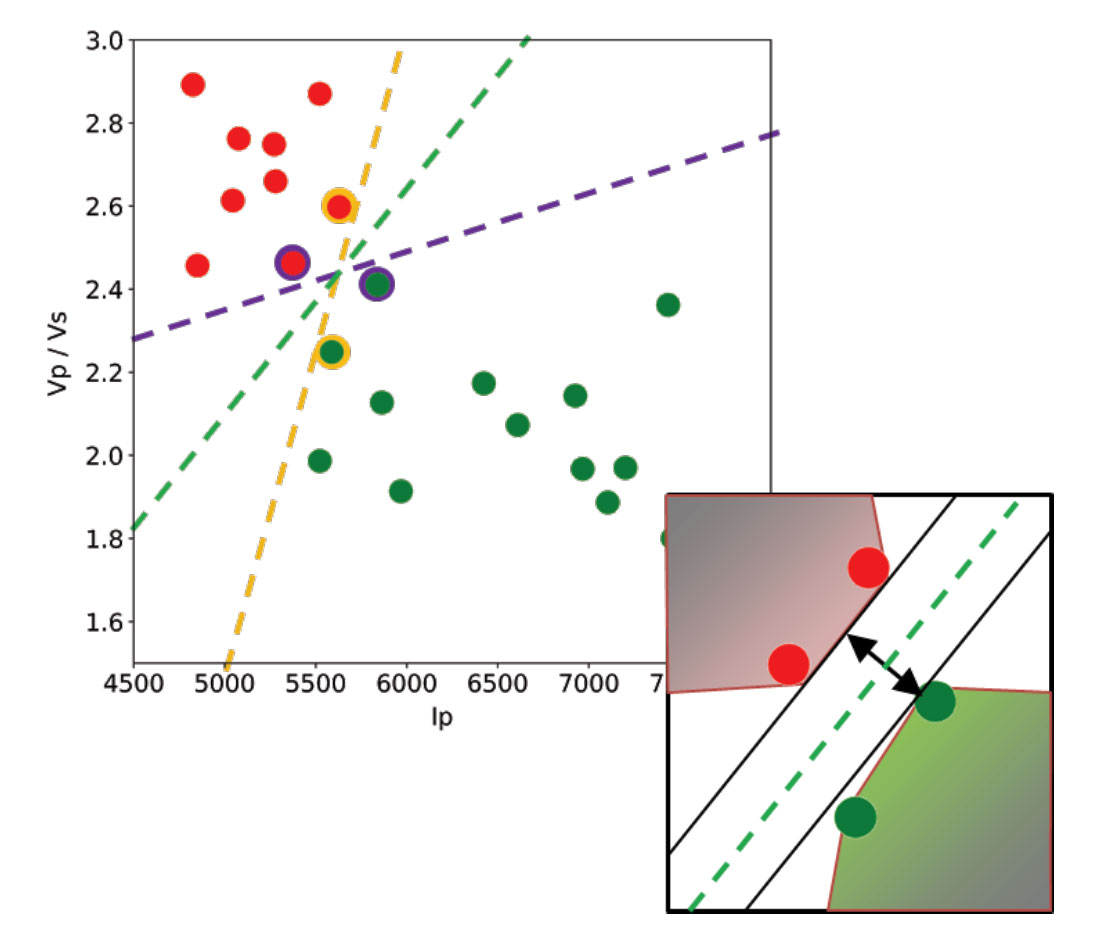
Let’s use a toy classification problem to understand in more detail how in practice SVMs achieve the class separation and find the hyperplane. In the figure below I show an idealized version (with far fewer points) of a Vp/Vs ratio versus P-impedance crossplot from Amato del Monte (2017, Seismic rock physics, tutorial on The Leading Edge).  I’ve added three possible boundaries (dashed lines) separating the two classes.

Each boundary is valid, but are they equally good? Well, for the SVM classifier, they are not because the classifier looks for the boundary with the largest distance from the nearest point in either of the classes.

These points, called Support Vectors, are the most representative of each class, and typically the most difficult to classify. They are also the only ones that matter; if a Support Vector is moved, the boundary will also move. However, if any other point is moved, provided that it is not moved into the margin or across the boundary, it would have no effect on the boundary. This makes SVM classifiers insensitive to outliers (points very far away from the rest of the points in their class and from the boundary) and also less memory intensive than other classifiers (for example, the perceptron). The process of finding this boundary is referred to as “maximizing the margin”, where the margin is a corridor with no data points between the boundary and the support vectors. The larger this buffer, the lower the generalization error; conversely, small margins are almost invariably associated with over-fitting. We will see more on this in a subsequent section.

So, to go back to the question, which of the three proposed boundaries is the best one (and by “best” I am referring to the one that will generalize better to unseen data)? Based on what we’ve learned so far, it would have to be the green boundary. Indeed, the orange one is so close to its support vectors (the two points circled with orange) that it leaves virtually no margin; the purple boundary is slightly better (the support vectors are the points circled with purple) but its margin is still quite small compared to the green boundary.

Maximizing the margin is the goal of the SVM classifier, and it is a constrained optimization problem. I refer interested readers to Hearst (1998, Support Vector Machines, IEEE Intelligent Systems); however, I will quote a definition from that paper (with reference to Figure 1 and accompanying text) as it yields further understanding: “… the optimal hyper-plane is orthogonal to the shortest line connecting the convex hulls of the two classes, and intersects it half way”.

In the inset in the figure, I zoomed closer to the 4 points near the green boundary; I’ve also drawn the convex hulls for the classes, the margin, and the shortest orthogonal line, which is bisected by the hyper-plane. I have selected (by hand) the best hyper-plane already (the green one), but if you can imagine rotating a line to span all possible orientations in the empty space close to the two classes without intersecting either of the hulls and find the one with the largest margin, you’ve just done quadratic optimization in your head. Moreover, you’ve turned a crossplot into a decision surface (quoted from Sebastian Thrun,  Intro to Machine Learning, Udacity 120 course).

If you are interested in learning more about Support Vector Machines in an intuitive way, and then how to try classification in practice (using Python and the Scikit-learn library), read the full article here, check the GitHub repo, then read How good is what? (blog post by Evan Bianco of Agile Scientific) for an example and DIY evaluation of  classifier performance.

Mild or wild: robustness through morphological filtering

This guest post (first published here) is by Elwyn Galloway, author of Scibbatical on WordPress. It is the forth in our series of collaborative articles about sketch2model, a project from the 2015 Calgary Geoscience Hackathon organized by Agile Geoscience. Happy reading.


We’re highlighting a key issue that came up in our project, and describing what how we tackled it. Matteo’s post on Morphological Filtering does a great job of explaining what we implemented in sketch2model. I’ll build on his post to explain the why and how. In case you need a refresher on sketch2model, look back at sketch2model, Sketch Image Enhancement, Linking Edges with Geomorphological Filtering.

Morphological Filtering

As Matteo demonstrated by example, sketch2model’s ability to segment a sketch properly depends on the fidelity of a sketch.

An image of a whiteboard sketch (left) divides an area into three sections. Without morphological filtering, sketch2model segments the original image into two sections (identified as orange, purple) (centre). The algorithm correctly segments the area into three sections (orange, purple, green) when morphological filtering is applied (right).

To compensate for sketch imperfections, Matteo suggested morphological filtering on binarized images. Morphological filtering is a set of image modification tools which modify the shape of elements in an image. He suggested using the closing tool for our purposes. Have a look at Matteo’s Post for insight into this and other morphological filters.

One of the best aspects of this approach is that it is simple to apply. There is essentially one parameter to define: a structuring element. Since you’ve already read Matteo’s post, you recall his onion analogy explaining the morphological filtering processes of erosion and dilation – erosion is akin to removing an onion layer, dilation is adding a layer on. You’ll also recall that the size of the structuring element is the thickness of the layer added to, or removed from, the onion. Essentially, the parameterization of this process comes down to choosing the thickness of the onion layers.

Sketch2model uses dilation followed by erosion to fill gaps left between sketch lines (morphological dilation followed by erosion is closing). Matteo created this really great widget to illustrate closing using an interactive animation.

Matteo’s animation was created using this interactive Jupyter notebook. Closing connects the lines of the sketch.

Some is Good, More is Better?

Matteo showed that closing fails if the structural element used is too small. So just make it really big, right? Well, there can be too much of a good thing. Compare what happens when you use an appropriately sized structuring element (mild) to the results from an excessively large structuring element (wild).

Comparing the results of mild and wild structuring elements: if the structuring element is too large, the filter compromises the quality of the reproduction.

Using a morphological filter with a structural element that is too small doesn’t fix the sketches, but using a structural element that is too large compromises the sketch too. We’re left to find an element that’s just right. Since one of the priorities for sketch2model was to robustly handle a variety of sketches with as little user input as possible — marker on whiteboard, pencil on paper, ink on napkin — we were motivated to find a way to do this without requiring the user to select the size of the structuring element.

Is there a universal solution? Consider this: a sketch captured in two images, each with their own resolution. In one image, the lines of the sketch appear to be approximately 16 pixels wide. The same lines appear to be 32 pixels wide in the other image. Since the size of the structuring element is defined in terms of pixels, it becomes apparent the ideal structuring element cannot be “one size fits all”.

High-resolution (left) versus low-resolution (right) image of the same portion of a sketch. Closing the gap between the lines would require a different size structuring element for each image: about 5 pixels for high-resolution or 1 pixel for low-resolution.

Thinking Like a Human

Still motivated to avoid user parameterization for the structuring element, we explored ways to make the algorithm intelligent enough to select an appropriate structuring element on its own. Ultimately, we had to realize a few things before we came up with something that would work:

  1. When capturing an image of a sketch, users compose very similar images (compose in the photographic sense of the word): sketch is centered and nearly fills the captured image.
  2. The image of a sketch is not the same as a user’s perception of a sketch: a camera may record imperfections (gaps) in a sketch that a user does not perceive.
  3. The insignificance of camera resolution: a sketched feature in captured at two different resolutions would have two different lengths (in pixels), but identical lengths when defined as a percentage of image size.

With these insights, we deduced that the gaps we were trying to fill with morphological filtering would be those that escaped the notice of the sketch artist.

Recognizing the importance of accurate sketch reproduction, our solution applies the smallest structuring element possible that will still fill any unintentional gaps in a sketch. It does so in a way that is adaptable.

A discussion about the definition of “unintentional gap” allowed us to create a mandate for the closing portion of our algorithm. Sketch2model should fill gaps the user doesn’t notice. The detail below the limit of the user’s perception should not affect the output model. A quick “literature” (i.e. Google) search revealed that a person’s visual perception is affected by many factors beyond the eye’s optic limits. Without a simple formula to define a limit, we did what any hacker would do… define it empirically. Use a bunch of test images to tweak the structuring element of the closing filter to leave the perceptible gaps and fill in the imperceptible ones. In the sketch2model algorithm, the size of structuring element is defined as a fraction of the image size, so it was the fraction that we tuned empirically.

Producing Usable Results

Implicit in the implementation is sketch2model’s expectation that the user’s sketch, and their image of the sketch are crafted with some care. The expectations are reasonable: connect lines you’d like connected; get a clear image of your sketch. Like so much else in life, better input gives better results.

Input (left) and result (right) of sketch2model.

To produce an adaptable algorithm requiring as little user input as possible, the sketch2model team had to mix a little image processing wizardry with some non-technical insight.

Have you tried it? You can find it at sketch2model.com. Also on GitHub.


Previous posts in the sketch2model series: sketch2model, Sketch Image Enhancement, Linking Edges with Geomorphological Filtering.

Machine Learning in Geoscience with Scikit-learn. Part 2: inferential statistics and domain knowledge to select features for oil prediction

In the first post of this series I showed how to use Pandas, Seaborn, and Matplotlib to:

  • load a dataset
  • test, clean up, and summarize the data
  • start looking for relationships between variables using scatterplots and correlation coefficients

In this second post, I will expand on the latter point by introducing some tests and visualizations that will help highlight the possible criteria for choosing some variables, and dropping others. All in Python.

I will use a different dataset than that in the previous post. This one is from the paper “Many correlation coefficients, null hypotheses, and high value“(Lee Hunt, CSEG Recorder, December 2013).

The target to be predicted is oil production from a marine barrier sand. We have measured production (in tens of barrels per day) and 7 unknown (initially) predictors, at 21 wells.

Hang on tight, and read along, because it will be a wild ride!

I will show how to:

1) automatically flag linearly correlated predictors, so we can decide which might be dropped. In the example below (a matrix of pair-wise correlation coefficients between variables) we see that X2, and X7, the second and third best individual predictors of production (shown in the bottom row) are also highly correlated to X1, the best overall predictor.

2) automatically flag predictors that fail a critical r test

3) create a table to assess the probability that a certain correlation is spurious, in other words the probability of getting at least the correlation coefficient we got with our the sample, or even higher, purely by chance.

I will not recommend to run these tests and apply the criteria blindly. Rather, I will suggest how to use them to learn more about the data, and in conjunction with domain knowledge about the problem at hand (in this case oil production), make more informed choices about which variables should, and which should not be used.

And, of course, I will show how to make the prediction.

Have fun reading: get the Jupyter notebook on GitHub.