Machine Learning in Python: classification using Support Vector Machines and Scikit-learn

This post is a short extract, with minor modifications,  from my recently released article on the check the CSEG Recorder Machine Learning in Geoscience V: Introduction to Classification with SVMs.

Understanding classification with Support Vector Machines

Support Vector Machines are a popular type of algorithm used in classification, which is the process of  “…identifying to which of a set of categories (sub-populations) a new observation belongs (source: Wikipedia).

In classification, the output variable is a category, for example ‘sand’, or ‘shale’, and the main task of the process is the creation of a dividing boundary between the classes. This boundary will be a line in a bi-dimensional space (only two features used to classify), a surface in a three dimensional space (three features), and a hyper-plane in a higher- dimensional space. In this article I will use interchangeably the terms hyper-plane, boundary, and decision surface.

Defining the boundary may sound like a simple task, especially with two features (a bidimensional scatterplot), but it underlines the important concept of generalization, as pointed out by Jake VanderPlas in his Introduction to Scikit-Learn, because ”… in drawing this separating line, we have learned a model which can generalize to new data: if you were to drop a new point onto the plane which is unlabeled, this algorithm could now predict…” the class it belongs to.

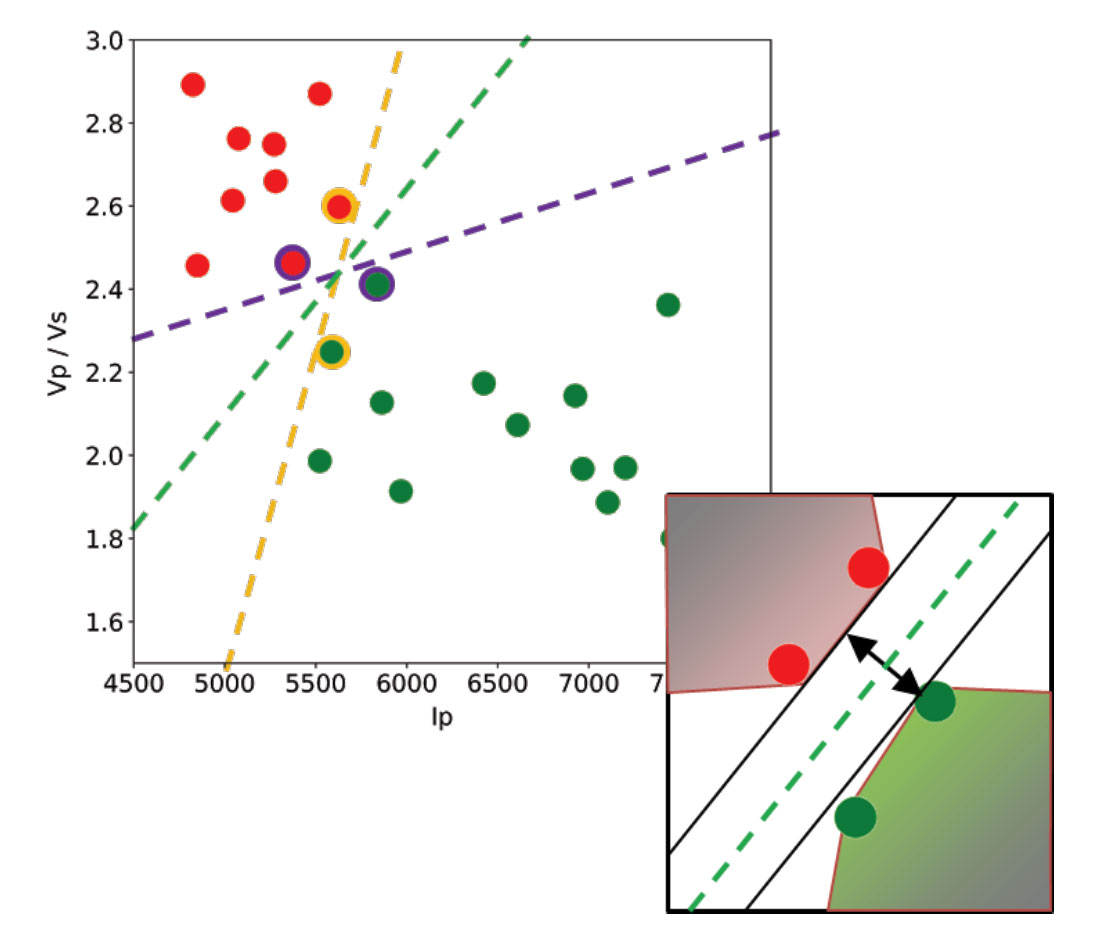
Let’s use a toy classification problem to understand in more detail how in practice SVMs achieve the class separation and find the hyperplane. In the figure below I show an idealized version (with far fewer points) of a Vp/Vs ratio versus P-impedance crossplot from Amato del Monte (2017, Seismic rock physics, tutorial on The Leading Edge).  I’ve added three possible boundaries (dashed lines) separating the two classes.

Each boundary is valid, but are they equally good? Well, for the SVM classifier, they are not because the classifier looks for the boundary with the largest distance from the nearest point in either of the classes.

These points, called Support Vectors, are the most representative of each class, and typically the most difficult to classify. They are also the only ones that matter; if a Support Vector is moved, the boundary will also move. However, if any other point is moved, provided that it is not moved into the margin or across the boundary, it would have no effect on the boundary. This makes SVM classifiers insensitive to outliers (points very far away from the rest of the points in their class and from the boundary) and also less memory intensive than other classifiers (for example, the perceptron). The process of finding this boundary is referred to as “maximizing the margin”, where the margin is a corridor with no data points between the boundary and the support vectors. The larger this buffer, the lower the generalization error; conversely, small margins are almost invariably associated with over-fitting. We will see more on this in a subsequent section.

So, to go back to the question, which of the three proposed boundaries is the best one (and by “best” I am referring to the one that will generalize better to unseen data)? Based on what we’ve learned so far, it would have to be the green boundary. Indeed, the orange one is so close to its support vectors (the two points circled with orange) that it leaves virtually no margin; the purple boundary is slightly better (the support vectors are the points circled with purple) but its margin is still quite small compared to the green boundary.

Maximizing the margin is the goal of the SVM classifier, and it is a constrained optimization problem. I refer interested readers to Hearst (1998, Support Vector Machines, IEEE Intelligent Systems); however, I will quote a definition from that paper (with reference to Figure 1 and accompanying text) as it yields further understanding: “… the optimal hyper-plane is orthogonal to the shortest line connecting the convex hulls of the two classes, and intersects it half way”.

In the inset in the figure, I zoomed closer to the 4 points near the green boundary; I’ve also drawn the convex hulls for the classes, the margin, and the shortest orthogonal line, which is bisected by the hyper-plane. I have selected (by hand) the best hyper-plane already (the green one), but if you can imagine rotating a line to span all possible orientations in the empty space close to the two classes without intersecting either of the hulls and find the one with the largest margin, you’ve just done quadratic optimization in your head. Moreover, you’ve turned a crossplot into a decision surface (quoted from Sebastian Thrun,  Intro to Machine Learning, Udacity 120 course).

If you are interested in learning more about Support Vector Machines in an intuitive way, and then how to try classification in practice (using Python and the Scikit-learn library), read the full article here, check the GitHub repo, then read How good is what? (blog post by Evan Bianco of Agile Scientific) for an example and DIY evaluation of  classifier performance.

Adding normal and reverse faults to an impedance model with Python

This is a short and sweet follow-up to yesterday’s post Making many synthetic seismic models in Python, in which I want to show how to add oblique faults to an impedance model, as opposed to a vertical one.

In the pseudo-code below, with the first line of code I select one of the impedance models from the many I created, then in lines 2 and 3, respectively, make two new versions, one shifted up 5 samples, one shifted down 5 samples. The impedance values for the extra volume added – at the bottom in the first case, the top in the second – are derived from the unshifted impedance model.

Next, I make two copies of the original, call them normal and reverse, and then replace the upper triangle with the upper triangle of the shifted down and shifted up versions, respectively.

unshifted = impedances[n]
up = sp.ndimage.interpolation.shift(unshifted, (5,0), cval=unshifted[0,0] * 0.9)
down = sp.ndimage.interpolation.shift(unshifted, (-5,0), cval=unshifted[0,-1] * 0.8)
normal = copy.deepcopy(unshifted)
reverse = copy.deepcopy(unshifted)
sz = len(unshifted)-1
normal[np.triu_indices(sz)] = up[np.triu_indices(sz)]
reverse[np.triu_indices(sz)] = down[np.triu_indices(sz)]

Done!
The results are shown in the figure below.

Left: unfaulted impedance model; center, model with normal fault; right, model with reverse fault.

Making many synthetic seismic models in Python

In this short post I show how to adapt Agile Scientific‘s Python tutorial x lines of code, Wedge model and adapt it to make 100 synthetic models in one shot: X  impedance models times X wavelets times X random noise fields (with I vertical fault).

You can download the notebook with the full code from GitHubN.B. the code is optimized for Python 2.7.

I begin by making a 6-layer model, shown in Figure 1:

model = numpy.zeros((50,49), dtype=np.int) 
model[8:16,:] = 1
model[16:24,:] = 2
model[24:32,:] = 3
model[32:40,:] = 4
model[40:,:] = 5

Figure 1. Initial 6-layer model

next I make some Vp-rho pairs (rock 0, rock 1, … , rock5):

rocks = numpy.array([[2700, 2750],  # Vp, rho
                  [2400, 2450],
                  [2600, 2650], 
                  [2400, 2450],
                  [2800, 3000], 
                  [3100, 3200],])

and then create 10 slightly different variations of the Vp-rho pairs one of which are is shown in Figure 2:

rnd = numpy.random.rand(10,6,2)*0.2
manyrocks = np.array([rocks + rocks*rn for rn in rnd], dtype=np.int)
earth = manyrocks[model]

Figure 2. A Vp-rho pair (earth model)

at which point I can combine Vp-rho pairs to make 10 impedance models, then insert a vertical fault with:

impedances = [np.apply_along_axis(np.product, -1, e).astype(float) for e in earth]# Python 2
faulted = copy.deepcopy(impedances)
for r, i in zip(faulted, np.arange(len(faulted))):
    temp = np.array(r)
    rolled = np.roll(np.array(r[:,:24]), 4, axis = 0)
    temp[:,:24]=rolled
    faulted[i]=temp

Figure 3. Four faulted impedance models.

next I calculate reflection coefficients (Figure 4)and convolve them with a list of 10 Ricker wavelets (generated using Agile’s Bruges) to make synthetic seismic models, shown in Figure 5.

rc =  [(flt[1:,:] - flt[:-1,:]) / (flt[1:,:] + flt[:-1,:]) for flt in faulted]
ws = [bruges.filters.ricker(duration=0.098, dt=0.002, f=fr) 
      for fr in [35, 40, 45, 50, 55, 60, 65, 70, 75, 80]]
synth = np.array([np.apply_along_axis(lambda t: np.convolve(t, w, mode='same'), axis=0,
      arr=r) for r in rc for w in ws ])

Figure 4. Four reflection coefficients series.

Figure 5. Four synthetic seismic models with vertical fault.

The last bit is the addition of noise, with the result is shown in Figure 6:

blurred = sp.ndimage.gaussian_filter(synth, sigma=1.1)
noisy = blurred + 0.5 * blurred.std() * np.random.random(blurred.shape)

Figure 6. Four synthetic seismic models with vertical fault and noise.

Done!

The notebook with the full code is on GitHub, let me know if you find this useful or if you come up with more modeling ideas.


UPDATE, April 22, 2019.

I received an email from a reader, Will, asking some clarification about this article and the making of many impedance models.  I’m re-posting here what I wrote back.

I think the key to understand this is how we multiply velocity by density in each of the possible earth model.

Looking at the notebook, the earth model array has shape:
print (np.shape(earth))
>>> (10, 50, 49, 2)
with the last axis having dimension 2: one Vp and one Rho, so in summary 10 models of size 50×49, each with a Vp and a Rho.
So with this other block of code:
impedances = [np.apply_along_axis(np.product, 
              -1, e).astype(float) for e in earth]

you use numpy.apply_along_axis  to multiply Vp by Rho along the last dimension, -1 , using numpy.product, and the list comprehension [... for e in earth] to do it for all models in the array earth.


Computer vision in geoscience: recover seismic data from images – part 1

As anticipated in the introductory post of this short series I am going to demonstrate how to automatically detect where a seismic section is located in an image (be it a picture taken from your wall, or a screen capture from a research paper), rectify any distortions that might be present, and remove all sorts of annotations and trivia around and inside the section.

You can download from GitHub all the tools for the automated workflow (including both part 1 and part 2, and some of the optional features outlined in the introduction) in the module mycarta.py, as well as an example Jupyter Notebook showing how to run it.

In this part one I will be focusing on the image preparation and enhancement, and the automatic detection of the seismic section (all done using functions from numpy, scipy, and scikit-image)In order to do that, first I convert the input image  (Figure 1) containing the seismic section to grayscale and then enhance it by increasing the image contrast (Figure 2).

Figure 1 – input image


Figure 2 – grayscale image

All it takes to do that is three lines of code as follows:

gry = skimage.color.rgb2gray(img);
p2, p95 = numpy.percentile(gry, (2, 95))
rescale = exposure.rescale_intensity(gry, in_range=(p2, p95))

For a good visual intuition of what actually is happening during the contrast stretching, check my post sketch2model – sketch image enhancements: in there  I show intensity profiles taken across the same image before and after the process.

Finding the seismic section in this image involve four steps:

  1. converting the grayscale image to binary with a threshold (in this example a global threshold with the Otsu method)
  2. finding and retaining only the largest object in the binary image (heuristically assumed to be the seismic section)
  3. filling its holes
  4. applying morphological operations to remove minutiae (tick marks and labels)

Below I list the code, and show the results.

global_thresh = threshold_otsu(rescale)
binary_global = rescale < global_thresh

Figure 3 – binary image

# (i) label all white objects (the ones in the binary image).
# scipy.ndimage.label actually labels 0s (the background) as 0 and then
# every non-connected, nonzero object as 1, 2, ... n.
label_objects, nb_labels = scipy.ndimage.label(binary_global)

# (ii) calculate every labeled object's binary size (including that 
# of the background)
sizes = numpyp.bincount(label_objects.ravel())

# (3) set the size of the background to 0 so that if it happened to be 
# larger than the largest white object it would not matter
sizes[0] = 0

# (4) keep only the largest object
binary_objects = remove_small_objects(binary_global, max(sizes))

Figure 4 – isolated seismic section

# Remove holes (black regions inside white object)
binary_holes = scipy.ndimage.morphology.binary_fill_holes(binary_objects)

Figure 5 – holes removed

enhanced = opening(binary_holes, disk(7))

Figure 6 – removed residual tick marks and labels

That’s it!!!

You can download from GitHub all the tools for the automated workflow (including both part 1 and part 2, and some of the optional features outlined in the introduction) in the module mycarta.py, as well as an example Jupyter Notebook showing how to run it.

In the next post, we will use this polygonal binary object both as a basis to capture the actual coloured seismic section from the input image and to derive a transformation to rectify it to a rectangle.

What is acquisition footprint noise in seismic data?

Acquisition footprint is a noise field that appears on 3D seismic amplitude slices or horizons as an interwoven linear crosshatching parallel to the source line and receiver line directions. It is for the most part an expression of inadequate acquisition geometry, resulting in insufficient sampling of the seismic wave field (aliasing) and irregularities in the offset and azimuth distribution, particularly in the cross line direction.

Sometimes source-generated noise and incorrect processing (for example residual NMO due to erroneous velocity picks, incomplete migration, or other systematic errors) can accentuate the footprint.

This noise can interfere with the mapping of stratigraphic features and fault patterns, posing a challenge to seismic interpreters working in both exploration and development settings.

To demonstrate the relevance of the phenomenon I show below a gallery of examples from the literature of severe footprint in land data: an amplitude time slice (Figure 1a) and a vertical section (Figure 1b) from a Saudi Arabian case study, some seismic attributes (Figures 2, 3, 4, and 5), and also some modeled streamer data (Figure 6).

Bannagi combo

Figure 1. Amplitude time slice (top, time = 0.44 s) showing footprint in both inline and crossline direction, and amplitude section (bottom) highlighting the effect in the vertical direction. From Al-Bannagi et al. Copyrighted material.

Penobscop_sobel

Figure 2. Edge detection (Sobel filter) on the Penobscot 3D horizon (average time ~= 0.98 s) displaying N-S footprint. From Hall.

F3_shallow_sobel

Figure 3. Edge detection (Sobel filter) on a shallow horizon (average time ~= 0.44 s)  from the F3 Netherlands 3D survey displaying E-W footprint.

Davogustto and Marfurt

Figure 4. Similarity attribute (top , time = 0.6 s), and most positive curvature (bottom, time = 1.3 s), both showing footprint. From Davogustto and Marfurt. Copyrighted material.

Chopra-Larsen

Figure 5. Amplitude time slice (top, time = 1.32 s) the corresponding  coherence section  (bottom) both showing footprint. From Chopra and Larsen. Copyrighted material.

Long et al

Figure 6. Acquisition footprint in the form of low fold striation due to dip streamer acquisition. From Long et al. Copyrighted material.

In my next post I will review (with more examples form literature) some strategies available to either prevent or minimize the footprint with better acquisition parameters and modeling of the stack response; I will also discuss some ways the footprint can be attenuated after the acquisition of the data (with bin regularization/interpolation, dip-steered median filters, and kx ky filters, from simple low-pass to more sophisticated ones) when the above mentioned strategies are not available, due to time/cost constraint or because the interpreter is working with legacy data.

In subsequent posts I will illustrate a workflow to model synthetic acquisition footprint using Python, and how to automatically remove it in the Fourier domain with frequency filters, and then how to remove it from real data.

References

Al-Bannagi et al. 2005 – Acquisition footprint suppression via the truncated SVD technique: Case studies from Saudi Arabia: The Leading Edge, SEG, 24, 832– 834.

Chopra and Larsen,  2000 – Acquisition Footprint, Its Detection and Removal: CSEG Recorder, 25 (8).

Davogusto and Martfurt, 2011 – Footprint Suppression Applied to Legacy Seismic Data Volumes: 31st Annual GCSSEPM Foundation Bob F Perkins Research Conference 2011.

F3 Netherlands open access 3D:  info on SEG Wiki

Hall, 2014 –  Sobel filtering horizons (open source Jupyter Notebook on GitHub).

Long et al., 2004 – On the issue of strike or dip streamer shooting for 3D multi-streamer acquisition: Exploration Geophysics, 35(2), 105-110.

Penobscot open access 3D:  info on SEG Wiki

Computer vision in geoscience: recover seismic data from images, introduction

In a recent post titled Unweaving the rainbow, Matt Hall described our joint attempt (partly successful) to create a Python tool to enable recovery of digital data from any pseudo-colour scientific image (and a seismic section in particular, like the one in Figure 1), without any prior knowledge of the colormap.

Seismic picture on wall

Figure 1. Test image: a photo of a distorted seismic section on my wall.

Please check our GitHub repository for the code and slides and watch Matt’s talk (very insightful and very entertaining) from the 2017 Calgary Geoconvention below:

In the next two post, coming up shortly, I will describe in greater detail my contribution to the project, which focused on developing a computer vision pipeline to automatically detect  where the seismic section is located in the image, rectify any distortions that might be present, and remove all sorts of annotations and trivia around and inside the section. The full workflow is included below (with sections I-VI developed to date):

  • I – Image preparation, enhancement:
    1. Convert to gray scale
    2. Optional: smooth or blur to remove high frequency noise
    3. Enhance contrast
  • II – Find seismic section:
    1. Convert to binary with adaptive or other threshold method
    2. Find and retain only largest object in binary image
    3. Fill its holes
    4. Apply opening and dilation to remove minutiae (tick marks and labels)
  • III – Define rectification transformation
    1. Detect contour of largest object find in (2). This should be the seismic section.
    2. Approximate contour with polygon with enough tolerance to ensure it has 4 sides only
    3. Sort polygon corners using angle from centroid
    4. Define new rectangular image using length of largest long and largest short sides of initial contour
    5. Estimate and output transformation to warp polygon to rectangle
  • IV – Warp using transformation
  • V – Blanking annotations inside seismic section (if rectangular):
    1. Start with output of (4)
    2. Pre-process and apply canny filter
    3. Find contours in the canny filter smaller than input size
    4. Sort contours (by shape and angular relationships or diagonal lengths)
    5. Loop over contours:
      1. Approximate contour
      2. If approximation has 4 points AND the 4 semi-diagonals are of same length: fill contour and add to mask
  • VI – Use mask to remove text inside rectangle in the input and blank (NaN) the whole rectangle. 
  • VII – Optional: tools to remove arrows and circles/ellipses:
    1. For arrows – contours from (4) find ones with 7 sizes and low convexity (concave) or alternatively Harris corner and count 7 corners, or template matching
    2. For ellipses – template matching or regionprops
  • VIII – Optional FFT filters to remove timing lines and vertical lines

You can download from GitHub all the tools for the automated workflow (parts I-VI) in the module mycarta.py, as well as an example Jupyter Notebook showing how to run it.

The first post focuses on the image pre-processing and enhancement, and the detection of the seismic line (sections I and II, in green); the second one deals with the rectification of the seismic (sections IV to V, in blue). They are not meant as full tutorials, rather as a pictorial road map to (partial) success, but key Python code snippets will be included and discussed.

Machine learning in geoscience with scikit-learn. Part 1: checking, tidying, and analyzing the dataset

The idea behind this series of articles is to show how to predict P-wave velocity, as measured by a geophysical well log (the sonic), from a suite of other logs: density, gamma ray, and neutron, and also depth, using Machine Learning.

The log suite is from the same well that Alessandro Amato del Monte used in the Seismic Petrophysics Notebook accompanying his Geophysical tutorial article on The Leading Edge.

I will explore different Machine Learning methods from the scikit-learn Python library and compare their performances.

To wet your appetites, here’s an example of P-wave velocity, Vp, predicted using a cross-validated linear model, which will be the benchmark for the performance of other models, such as SVM and Random Forest:

multilinear

In the first notebook, which is already available on GitHub here, I show how to use the Pandas and Seaborn Python libraries to import the data, check it, clean it up, and visualize to explore relationships between the variables. For example, shown below is a heatmap with the pairwise Spearman correlation coefficient between the variables (logs):

heatmap

Stay tuned for the next post / notebook!

PS: I am very excited by the kick-off of the Geophysical Tutorial (The Leading Edge) Machine Learning Contest 2016. Check it out here!

Machine learning in geoscience and planetary science with scikit-learn: series outline

  • Machine learning in geoscience with scikit-learn. Part 3: the SEG ML contest
  • Machine Learning in Geoscience with Scikit-learn. Part 4: TBE