Colormap compromise

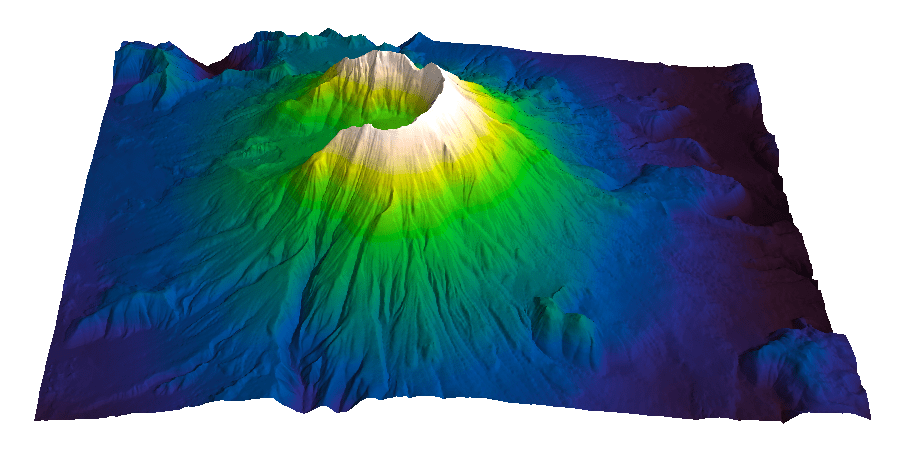
At the end the series The rainbow is dead…long live the rainbow! I introduced CubicYF, a rainbow-like color palette with a slightly compressive, monotonic increasing lightness profile. The red color is missing from the palette because green and red at people with deuteranopia, the most common type of color vision deficiency, confuse red and green, so I took one out. An alternative solution to taking the red out is to have a yellow-like color with lower lightness followed by a red-like color of higher lightness, like in the LinearL palette described The rainbow is dead…long live the rainbow! – Part 5. A third solution, which is a compromise in perceptual terms, is CubicL (sometimes I called it cube1), the color palette I used with the gravity data from my degree thesis in geology in the series Visualization tips for geoscientists. An example map from the series in which I used CubicL is in Figure 1 below:

data cube1_final_shading_slope

Figure 1

To generate CubicL  I used a compressive function for the increase in lightness very much like the one for CubicYF, except in this case I allowed lightness to decrease from about 90 in the yellow portion of the colormap to about 80 to get to the red. As a result, there is an inversion in the lightness trend, indicated by the arrow in the bottom row in Figure 2. However, I believe this is an acceptable compromise, and one that is pleasing for people accustomed to rainbow (it has red), because the inversion is smooth, with a gentle downward-facing concavity. I also believe this colormap is still a perceptual improvement over the rainbow or spectrum so commonly used in seismic visualization, which typically have at least 3 sharp lightness inversions (indicated by arrows in the top row of Figure 2 below).

spectrum_vs_cubeY

Figure 2

CubicL is one of the colormaps available in my Matlab File Exchange function Perceptually Improved Colormaps.

Parula: a new Matlab colormap

Steve Eddins of the Matwork just published a post announcing a new Matlab colormap to replace Jet. It is called Parula (more to come on his blog about this intriguing name).

parula

First impression: Parula looks good.

And while I haven’t had time to take it into Python to run a full perceptual test and into ImageJ for a colour blindness test, as a preliminary test I did convert it to grayscale with an online picture converting tool that uses the lightness information to perform the conversion (instad of just desaturating the colors) and the result shows monotonic changes in gray.

parula_compare

Looks promising… Full test to come.

What your brain does with colours when you are not “looking” – part 1

When I published the last post of my series The rainbow is dead…long live the rainbow! there was a great discussion in the comments section with Giuliano Bernardi, a Ph.D. student at the University of Leuven, on the use of different colour palettes in audio spectrogram visualization.

Since then Giuliano has been kind enough to provide me with the data for one of his spectrograms, so I am resuming the discussion. Below here is a set of 5 figures generated in Matlab from the same data using different colormaps. With this post I’d like to get readers involved and ask to cast your vote for the colormap you prefer, and even drop a line in the comments section to tell us the reason for your preference.

In the second post I’ll show the data displayed with the same 5 colormaps but using a different type of visualization, which will reveal what our brain is doing with the colours (without our full knowledge and consent), and then I will ask again to vote for your favourite.


spectrogram_jet

A – Jet colormap

spectrogram_gray

B – Gray scale

spectrogram_lin_L_rainbow

C – Linear Lightness rainbow

spectrogram_mod_heated_body

D – Modified heated body (linear Lightness)

spectrogram_CubicYF

E – Cube-law Lightness rainbow

Visualize Mt St Helen with Python and a custom color palette

Evan Bianco of Agile Geoscience wrote a wonderful post on how to use python to import, manipulate, and display digital elevation data for Mt St Helens before and after the infamous 1980 eruption. He also calculated the difference between the two surfaces to calculate the volume that was lost because of the eruption to further showcase Python’s capabilities. I encourage readers to go through the extended version of the exercise by downloading his iPython Notebook and the two data files here and here.

I particularly like Evan’s final visualization (consisting of stacked before eruption, difference, and after eruption surfaces) which he created in Mayavi, a 3D data visualization module for Python. So much so that I am going to piggy back on his work, and show how to import a custom palette in Mayavi, and use it to color one of the surfaces.

Python Code

This first code block imports the linear Lightness palette. Please refer to my last post for instructions on where to download the file from.

import numpy as np
# load 256 RGB triplets in 0-1 range:
LinL = np.loadtxt('Linear_L_0-1.txt') 
# create r, g, and b 1D arrays:
r=LinL[:,0] 
g=LinL[:,1]
b=LinL[:,2]
# create R,G,B, and ALPHA 256*4 array in 0-255 range:
r255=np.array([floor(255*x) for x in r],dtype=np.int) 
g255=np.array([floor(255*x) for x in g],dtype=np.int)
b255=np.array([floor(255*x) for x in b],dtype=np.int)
a255=np.ones((256), dtype=np.int); a255 *= 255;
RGBA255=zip(r255,g255,b255,a255)

This code block imports the palette into Mayavi and uses it to color the Mt St Helens after the eruption surface. You will need to have run part of Evan’s code to get the data.

from mayavi import mlab
# create a figure with white background
mlab.figure(bgcolor=(1, 1, 1))
# create surface and passes it to variable surf
surf=mlab.surf(after, warp_scale=0.2)
# import palette
surf.module_manager.scalar_lut_manager.lut.table = RGBA255
# push updates to the figure
mlab.draw()
mlab.show()

After_Linear_L

Reference

Mayavi custom colormap example


Related Posts (MyCarta)

The rainbow is dead…long live the rainbow! – Part 5 – CIE Lab linear L* rainbow

Convert color palettes to Python Matplotlib colormaps

Related Posts (external)

How much rock was erupted from Mt St Helens

Convert color palettes to python matplotlib colormaps

This is a quick post to show you how to import my perceptual color palettes – or any other color palette – into Python and convert them into Matplotlib colormaps. We will use as an example the CIE Lab linear L* palette, which was my adaptation to Matlab of the luminance controlled colormap by Kindlmann et al.

Introduction

You can use the code snippets in here or download the iPython notebook from here (*** please see update ***). You will need NumPy in addition to Matplotlib.

***  UPDATE  ***

Fellow Pythonista Matt Hall of Agile Geoscience extended this work – see comment below to include more flexible import of the data and formatting routines, and code to reverse the colormap. Please use Matt’s expanded iPython notebook.

Preliminaries

First of all, get the color palettes in plain ASCII format rom this page. Download the .odt file for the RGB range 0-1 colors, change the file extension to .zip, and unzip it. Next, open the file Linear_L_0-1, which contains comma separated values, replace commas with tabs, and save as .txt file. That’s it, the rest is in Python.

Code snippets – importing data

Let’s bring in numpy and matplotlib:

%pylab inline
import numpy as np
%matplotlib inline
import matplotlib.pyplot as plt

Now we load the data. We get RGB triplets from tabs delimited text file. Values are expected in the 0-1 range, not 0-255 range.

LinL = np.loadtxt('Linear_L_0-1.txt')

A quick QC of the data:

LinL[:3]

gives us:

array
([[ 0.0143,  0.0143,  0.0143],
  [ 0.0404,  0.0125,  0.0325],
  [ 0.0516,  0.0154,  0.0443]])

looking good!

Code snippets – creating colormap

Now we want to go from an array of values for blue in this format:

b1=[0.0000,0.1670,0.3330,0.5000,0.6670,0.8330,1.0000]

to a list that has this format:

[(0.0000,1.0000,1.0000),
(0.1670,1.0000,1.0000),
(0.3330,1.0000,1.0000),
(0.5000,0.0000,0.0000),
(0.6670,0.0000,0.0000),
(0.8330,0.0000,0.0000),
(1.0000,0.0000,0.0000)]

# to a dictionary entry that has this format:

{
'blue': [
(0.0000,1.0000,1.0000),
(0.1670,1.0000,1.0000),
(0.3330,1.0000,1.0000),
(0.5000,0.0000,0.0000),
(0.6670,0.0000,0.0000),
(0.8330,0.0000,0.0000),
(1.0000,0.0000,0.0000)],
...
...
}

which is the format required to make the colormap using matplotlib.colors. Here’s the code:

b3=LinL[:,2] # value of blue at sample n
b2=LinL[:,2] # value of blue at sample n
b1=linspace(0,1,len(b2)) # position of sample n - ranges from 0 to 1

# setting up columns for list
g3=LinL[:,1]
g2=LinL[:,1]
g1=linspace(0,1,len(g2))

r3=LinL[:,0]
r2=LinL[:,0]
r1=linspace(0,1,len(r2))

# creating list
R=zip(r1,r2,r3)
G=zip(g1,g2,g3)
B=zip(b1,b2,b3)

# transposing list
RGB=zip(R,G,B)
rgb=zip(*RGB)
# print rgb

# creating dictionary
k=['red', 'green', 'blue']
LinearL=dict(zip(k,rgb)) # makes a dictionary from 2 lists

Code snippets – testing colormap

That’s it, with the next 3 lines we are done:

my_cmap = matplotlib.colors.LinearSegmentedColormap('my_colormap',LinearL)
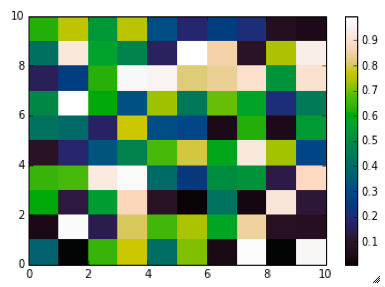
pcolor(rand(10,10),cmap=my_cmap)
colorbar()

which gives you this result: LinearL test Notice that if the original file hadn’t had 256 samples, and you wanted a 256 sample color palette, you’d use the line below instead:

my_cmap = matplotlib.colors.LinearSegmentedColormap('my_colormap',LinearL,256)

Have fun!

Related Posts (MyCarta)

The rainbow is dead…long live the rainbow! – Part 5 – CIE Lab linear L* rainbow

Visualize Mt S Helens with Python and a custom color palette

A bunch of links on colors in Python

http://bl.ocks.org/mbostock/5577023

http://matplotlib.org/api/cm_api.html

http://matplotlib.org/api/colors_api.html

http://matplotlib.org/examples/color/colormaps_reference.html

http://matplotlib.org/api/colors_api.html#matplotlib.colors.ListedColormap

http://wiki.scipy.org/Cookbook/Matplotlib/Show_colormaps

http://stackoverflow.com/questions/21094288/convert-list-of-rgb-codes-to-matplotlib-colormap

http://stackoverflow.com/questions/16834861/create-own-colormap-using-matplotlib-and-plot-color-scale

http://stackoverflow.com/questions/11647261/create-a-colormap-with-white-centered-around-zero

NASA Worldview satellite image browser adopts MyCarta perceptual rainbow

I was thrilled this week to learn from Ryan Boller that his team at NASA’s ESDIS Project included MyCarta’s perceptual rainbow (the CubicYF) as one of the palettes for the Worldview satellite imagery browser.

If you’d like to try it, once on the viewer you can load an overlay and then you can choose from among several color palettes. The perceptual rainbow palette is listed here as “Rainbow 2”.

I am including below an example using the Land surface temperature for April 13 2013 from MODIS Aqua mission:

Land_surf_temp_130413

This is really exciting news as NASA’s adoption will increase the palette’s exposure and its chances of becoming more mainstream. This is also as close as I will ever get to realizing my childhood dream of becoming an astronaut. Thanks ESDIS, and thanks Ryan, on both accounts.

An introduction to color palettes for seismic amplitude – teaser

Introduction

In a future posts I will take a look at some of the color palettes used for seismic amplitude display, and discuss ways we can design more perceptual and more efficient ones.

For now, I would like to ask readers to look at two sets of seismic images and answer the survey questions in each section. Far from being exhaustive sets, these are meant as a teaser to get a conversation started and exchange opinions and preferences.

Stratigraphic interpretation

The seismic line below is inline 424 from the F3 dataset, offshore Netherlands from the Open Seismic Repository (licensed CC-BY-SA).

I generated an animation, played at 0.5 frames/second, where 8 different color palette are alternated in sequence.  Please click on the image to see a full resolution animation. I also generated a 0.25 frame/second version and a 1 frame/second version.

05

Fault interpretation

The images used to create the panel below are portions of seismic displays kindly provided by Steve Lynch of 3rd Science Solutions, generated using data released by PeruPetro. I am grateful to both.

faults_sm

Thanks to Matt Hall and Evan Bianco of Agile Geoscience for their suggestions.

Color palettes for seismic structure maps and attributes

I created three color palettes for structure maps (seismic horizons, elevation maps, etcetera) and seismic attributes. To read about the palettes please check these previous blog posts:

The rainbow is dead…long live the rainbow! – Part 5 – CIE Lab linear L* rainbow
The rainbow is dead series – Part 7 – Perceptual rainbow palette – the method
The rainbow is dead series – Part 7 – Perceptual rainbow palette – the goodies

The palettes are available as plain ASCII files and also formatted for a number of platforms and software products:

Geosoft
Hampson-Russell
Kingdom
Madagascar
Matlab
OpendTect
Petrel
Seisware
Surfer
Voxelgeo

Please download them from my Color Palettes page and follow instructions therein.

Enjoy!

linearlfb

Image courtesy of Sergey Fomel of the Madagascar Development blog